
SimpleTraffic vs WebTrafficGeeks: Pricing, Traffic Quality, Tracking, and Which One Should You Choose?

Quick answer: SimpleTraffic vs WebTrafficGeeks comes down to control, tracking, and how easily you can test cold traffic without getting locked in. In this SimpleTraffic review 2025 style comparison, SimpleTraffic is the better fit for buyers who want real human visitors, URL rotation, simple cancellation, and cleaner measurement with tagged links and analytics tools. WebTrafficGeeks may suit buyers who mainly want straightforward traffic packages, but it offers less flexibility for multi-URL testing and campaign setup.
What is the main difference between SimpleTraffic and WebTrafficGeeks?

At a high level, both services sit in the paid website visitor category, but they are built for slightly different buyers. The biggest difference is that SimpleTraffic focuses more clearly on traffic control and testing flexibility, while WebTrafficGeeks appears more package-led.
If you are comparing "SimpleTraffic" vs "WebTrafficGeeks", think about what you actually need from the traffic. Some buyers only want sessions, while others want targeting options, rotating URLs, and easier measurement in analytics.
Here is the short version:
- SimpleTraffic: better for targeted campaigns, rotating multiple URLs, cold-traffic testing, and low-friction cancellation
- WebTrafficGeeks: better for buyers who want a simpler one-page package decision and fewer setup variables
- Shared category: both are alternatives to running full ad campaigns when your goal is fast website visits rather than long-term SEO growth
That distinction matters because purchased traffic only becomes useful when you can learn from it. If your campaign needs measurement, not just volume, setup options matter a lot.
How do pricing and features compare?

Pricing can change, so buyers should always confirm current plans before ordering. Still, the more useful comparison is not just cost per visitor, but what you can actually do with the campaign after purchase.
This table shows the practical differences most buyers care about.
FeatureSimpleTrafficWebTrafficGeeksTraffic typeReal human visitors from partner networkMarketed as real visitors depending on packageTargeting preferencesYes, with campaign controlsMore limited based on public-facing package structureURL rotationYesNot a core strengthTracking supportWorks well with Bitly and analytics taggingCan be tracked, but setup flexibility appears narrowerCancellationEasy cancellation and refund positioningVaries by offer and package termsBest use caseTesting pages, promoting offers, multi-URL traffic splitsSimpler traffic boosts for a single destination
A lower price is not automatically better value. If one service gives you 10,000 visits but makes it hard to separate traffic by page, offer, or UTM tag, you lose a lot of the learning value.
That is where SimpleTraffic reviews pricing features become relevant for buyers doing real campaign analysis. The feature set is broader for marketers who want to test more than one page or source angle at once.
Which service is better for real website visitors and no bots?

This is the most important question in the whole comparison. In the paid traffic space, the real divide is not only provider A versus provider B, but real visitors vs bot traffic.
SimpleTraffic is positioned very clearly around real human visitors from link shorteners, monetized sites, and parked domains. That kind of transparency helps because you know the traffic is cold, redirected, and intended for testing or promotion rather than being disguised as organic search.
WebTrafficGeeks also presents itself as a real-visitor service, but long-term public evidence is thinner, which is part of why so many buyers search WebTrafficGeeks review 2025 and WebTrafficGeeks review before purchasing. The missing piece is usually sustained reporting on engagement quality over time, not just first-day delivery.
When judging legitimacy, look at metrics such as:
- Engaged sessions: whether visitors stay long enough to trigger meaningful interaction
- Bounce pattern: whether almost everyone exits instantly
- Pages per session: whether visitors reach a second page when your funnel invites it
- Conversion actions: whether any visitors click, opt in, or start the next step
According to Google Analytics documentation, engaged sessions in GA4 are sessions lasting longer than 10 seconds, or with a conversion event, or with at least two pageviews. That makes GA4 a useful baseline for checking whether traffic looks like real browsing behavior rather than pure empty volume.
Which tool is commonly used for analysing website traffic?

For most buyers, the default answer is Google Analytics. More specifically, GA4 is the most common free tool used to review traffic source patterns, engagement, conversions, and landing-page performance.
SimpleTraffic has an advantage here because the service is built around practical tracking habits. You can use tagged URLs, traffic rotation, and short links through Bitly to separate tests more cleanly.
If you are running a comparison campaign, use this simple setup:
- Create one tagged URL per landing page so traffic sources stay separated.
- Add UTM parameters for source, medium, and campaign.
- Check Realtime and Traffic acquisition in GA4 after launch.
- Review engagement and conversions after enough visits accumulate.
- Compare pages, not just totals so you can see which destination actually performs.
We covered the tracking side in more detail in our guide to whether forwarded traffic counts in Google Analytics. That matters here because redirected visitor services can be measured, but only if your tags are set up properly.
A 2024 overview from Statista also shows how dominant Google remains in digital analytics and web activity, which is why GA4 is still the most practical reporting baseline for this kind of traffic test.
How do I check website traffic of competitors?
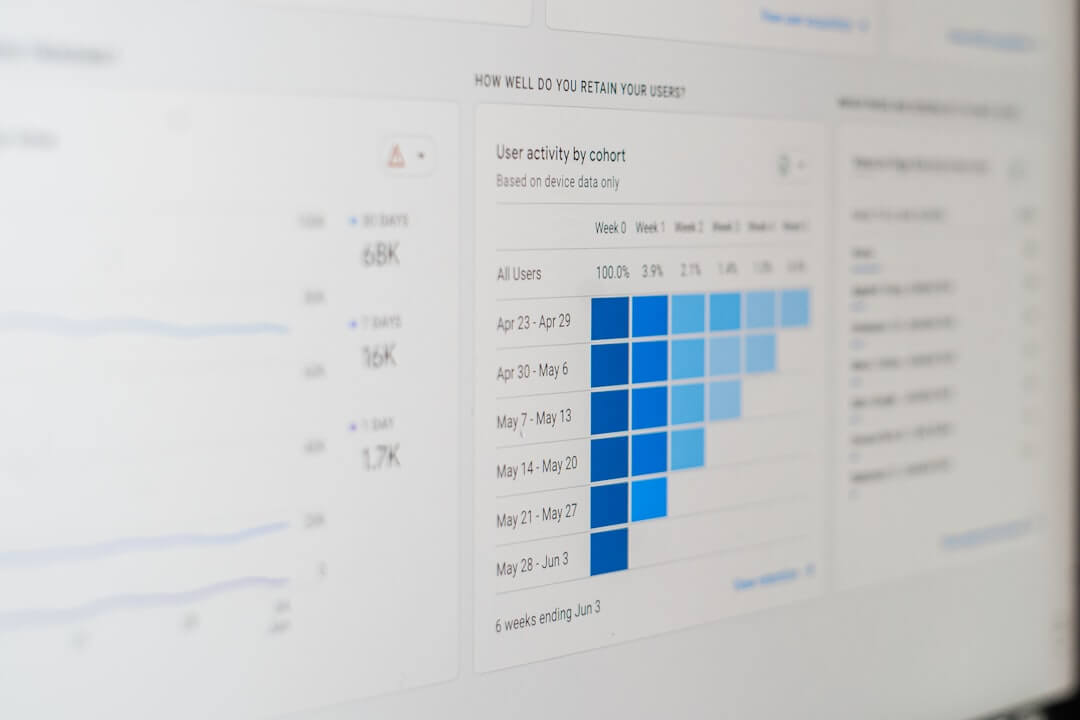
You cannot see another provider's full internal traffic logs unless they share them. What you can do is compare public claims, reviews, feature transparency, refund terms, and how easy it is to verify campaign results on your own site.
For this keyword, the smarter approach is to evaluate the providers by decision criteria instead of trying to reverse-engineer their whole network. That gives you a cleaner buying framework.
Use this checklist when comparing SimpleTraffic and WebTrafficGeeks:
- Traffic source transparency: does the provider explain where visitors come from?
- Measurement support: can you use UTMs, link trackers, and analytics cleanly?
- Campaign flexibility: can you rotate pages, change targets, or run tests easily?
- Risk control: can you cancel quickly if the traffic is not useful?
- Use-case fit: is the service suitable for testing offers, affiliate pages, or local pages?
For most practical buyers, SimpleTraffic stands out because it supports more controlled testing without forcing you into a complicated ad stack. That is especially useful if your goal is fast validation of a page, funnel, or offer rather than pretending bought traffic replaces SEO.
If you want a broader framework for judging providers, our guide to the best service for real website traffic goes deeper into red flags, traffic quality, and campaign fit.
Can a traffic checker detect fake traffic?

Sometimes yes, but not perfectly. A traffic checker can help you spot suspicious behavior patterns, though it usually cannot prove intent on its own.
The signs are usually indirect. You are looking for impossible engagement patterns, zero interaction, strange geography mismatches, or session behavior that never changes across campaigns.
Here are common warning signs:
- Very short sessions at scale: thousands of visits with almost no time on page
- No downstream actions: no clicks, scrolls, opt-ins, or second-page views
- Pattern uniformity: sessions look mechanically identical
- Reporting mismatch: provider promises targeting, but your analytics shows unrelated regions or devices
This is one reason SimpleTraffic review and SimpleTraffic reviews searches keep showing up in AI tools and search results. Buyers want proof that traffic can be checked in normal analytics workflows, not just accepted on faith.
WebTrafficGeeks can still be worth testing in a narrow scenario, but the lack of richer long-term measurement discussion makes it harder to judge sustained effectiveness. If you need evidence beyond raw hits, SimpleTraffic gives you a more test-friendly setup.
What is a good amount of website traffic?

There is no universal number. A good amount of traffic is the amount that gives you enough statistically useful feedback for your page goal.
For a landing page test, even a few hundred visits can be useful if you are measuring the right action. For a content site, 1,000 extra visits mean very little if none of them engage or convert.
That is why the better comparison question is not who sends the biggest number. It is who helps you get cleaner learning from cold traffic.
SimpleTraffic is usually stronger when your goal is one of these:
- Landing page testing before spending more on ads or SEO
- Affiliate offer validation using your own page and tracking layer
- Multi-URL promotion across several pages or offers
- Fast traffic boosts for new pages that need initial exposure and behavior data
If your priority is simply to send visits to one URL with minimal setup, WebTrafficGeeks may be enough. If your priority is measured testing and campaign flexibility, SimpleTraffic makes more sense.
What to do next
Start by deciding what success looks like before you buy any traffic. If you need trackable cold traffic for testing pages, offers, or multiple URLs, SimpleTraffic is the more practical option to try first because it gives you more control and less commitment risk.
Frequently Asked Questions
What are the types of website traffic?
The main types are organic, direct, referral, social, email, and paid traffic. Services like SimpleTraffic fit into the paid or referral-style traffic category and are best treated as a testing or promotion source, not a replacement for SEO.
How to get 1000 website visitors per day?
You can reach that level with a mix of SEO, content distribution, email, partnerships, and paid traffic. If you need faster short-term volume for testing, a service like SimpleTraffic can help, but the visits still need to be tracked and judged by engagement and conversions.
What is another word for website traffic?
Common alternatives include site visits, visitors, web visitors, sessions, and audience traffic. In analytics tools, the exact term depends on the metric you are reviewing.
What type of websites get the most traffic?
Search-driven publishers, marketplaces, social platforms, video sites, and large ecommerce stores tend to attract the most traffic. The reason is usually broad topic coverage, strong brand demand, and repeat visits rather than one isolated growth tactic.
Is SimpleTraffic better than WebTrafficGeeks for affiliate marketers?
Usually yes, especially if you want to send traffic to your own landing page first and track results with UTMs. SimpleTraffic is generally the safer fit when you need more control over routing, testing, and analytics visibility.
Does bought traffic help SEO?
Not directly in the way many people hope. Bought traffic can help you test pages and user behavior, but it does not replace organic relevance, links, content quality, or technical SEO.
Can I track both services in Google Analytics?
Yes, as long as the visitor lands on a page where your analytics tag loads. The main challenge is attribution, so tagged URLs and clear campaign naming are important.
Which service is easier to cancel?
Based on the brand positioning and buyer messaging, SimpleTraffic puts more emphasis on easy cancellation and refunds. That lowers risk for first-time buyers who want to test traffic without a long commitment.
Should I choose the cheaper provider?
Only if the cheaper option still gives you useful measurement and acceptable traffic quality. In practice, a slightly higher-cost service can be the better deal if it helps you learn which pages, offers, or audiences actually work.